
Story lifecycle
Every chapter has one of six statuses. The status tells you:
- whether you can edit the chapter,
- whether readers can download it,
- whether a reviewer is holding it.
The status changes when you submit the chapter, build a test package or withdraw it.
The story has no status of its own:
- It counts as published once any chapter is live.
- It counts as in review while a chapter is in review.
- It counts as in testing while you test-build a chapter.
The statuses
Section titled “The statuses”These are the labels from the chapter list. Two statuses share the label In review, so you see five names for six statuses.
- Draft: you hold it. Readers see nothing, and you can edit everything.
- Testing: you hold it, and contributors read a test build. Only contributors can see it, and you can edit everything.
- In review: a reviewer holds it. Readers see nothing, and you can’t edit anything in the graph.
- Published: nobody holds it. Readers see the approved version, and you can edit the content but not the graph.
- In review, on a chapter that is already published: a reviewer holds it. Readers still see the approved version, and you can’t edit anything in the graph.
- Published · revising: you hold it. Readers see the approved version, and you can edit the content but not the graph.
A live chapter that you resubmit is labelled In review, in the same colour as a first submission.
On the Dashboard:
- The Published tab lists every live chapter.
- The In Review tab lists every chapter with a reviewer.
- A chapter on both tabs is live and has a new version waiting in the queue.
Contributors are an exception to what readers see. A team member can open any chapter of yours that isn’t a draft.
Editable content
Section titled “Editable content”Once a chapter is live, its structure locks. You can’t add, delete, relink or group nodes. You can still edit what is already in the graph, for example change a text or swap an image.
Instead of editing a locked item, you can add a new one. The editor tells you so at the lock: “Locked by a published story. You can add a new one instead.”
First publication
Section titled “First publication”The first time a chapter goes out, it takes one of two routes: straight to review, or through testing first.
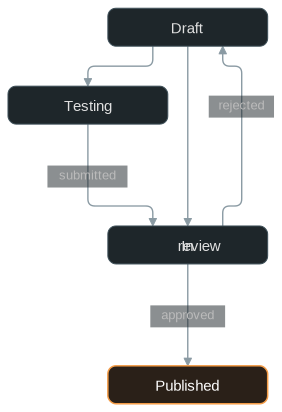
Testing is optional.
- You can start testing from Draft, or from Testing when you rebuild the package.
- You can’t test a live chapter. Updates go through review instead.
- A chapter in Testing stays fully editable. Your testers see nothing new until you rebuild the package.
Chapter updates
Section titled “Chapter updates”An update takes a shorter route.
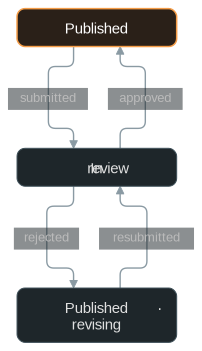
A published chapter goes straight back into review when you resubmit it. If the reviewer sends it back, it becomes Published · revising.
Readers keep the approved version the whole time. The new version waits in review.
- An approval releases the new version and retires the old one.
- If you cancel the review, the waiting version is discarded. The published one stays live.
Rejection
Section titled “Rejection”A rejection comes with the reviewer’s notes. Each note is pinned to the node or component it is about, and the same notes arrive by email. (A reviewer can’t use Reject until the chapter has at least one note that didn’t come from a tester.)
Where the chapter lands depends on whether it was already live:
- Never published: it returns as an editable Draft.
- Already live: it returns as Published · revising. Readers still have it and the graph stays locked. You fix the content and resubmit.
The chapter shows up on the Dashboard under Needs Attention, with a link to the reviewer’s feedback.
Notes marked High priority block approval. Clear them yourself. Open Notes in the editor and use Mark as complete on each one. The other notes are advice. See Working with review feedback.
Withdrawal and removal
Section titled “Withdrawal and removal”Withdraw from review pulls the chapter out of the queue before the reviewer decides. A first submission goes back to Draft. A live chapter goes back to Published, unchanged. You find the button in three places:
- the chapter list
- the dropdown on the editor’s publish button
- the In Review tab of the Dashboard
Remove testing returns a chapter in testing to Draft and deletes the test package. Your story content is kept. The button isn’t in the chapter list. To find it, open the publish dialog and choose Test with contributors first. The button is on that panel.
Unpublishing. You can’t unpublish a live chapter in the editor. Only TalePort can do that. You can delete the chapter, which also removes it for readers.
Deleting. You can’t delete a chapter that is in review, or a story’s last chapter. While the editor is still open, undo brings a deleted chapter back.