
Story structure
A chapter is a graph: nodes with content, links between them, and points where the reader decides something. Its shape decides how much you write, what the chapter costs, and how much you can change after it goes live.
Branching and reconverging
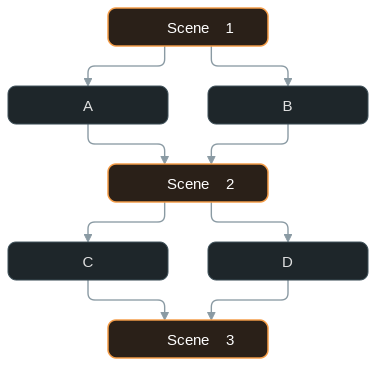
Section titled “Branching and reconverging”Build the chapter as a sequence of scenes. Let each scene branch inside itself, then bring the branches back together before the next scene.
- Branches that never rejoin multiply through the rest of the chapter, so writing and testing grow with every decision.
When you rejoin branches, you write the next scene only once. The branches themselves still need extra text and testing, but their number no longer multiplies through the rest of the chapter.
Scenes don’t pass on a path. They pass on state, the values of your variables. Readers who chose differently arrive at the same scene, with one variable holding a different value.
Branch placement
Section titled “Branch placement”Split the story into separate paths at only one or two points. Each path must rejoin or end. Four independent full-length routes are four chapters you must write, test and send to review.
Pricing uses the longest single playthrough, not everything the chapter contains. Four parallel routes of the same length don’t multiply the price by four. TalePort measures one route. The others affect the price only through the interactivity bonus, which has a cap.
The bonus counts decision points, not volume. Content with nothing to decide adds almost nothing. Four long parallel routes hold one decision point between them. A main route that branches and rejoins holds dozens over the same hour.
What locks after publishing
Section titled “What locks after publishing”Once a chapter is live, its graph structure is locked. The status bar says: “Published: graph structure locked, content editable”.
| You can | You can’t |
|---|---|
| Rewrite a node’s text | Add or remove a node |
| Edit a dialogue line | Add or remove a link |
| Swap an image or an audio file | Add or remove a component, a choice option, a dialogue line or a switch condition |
| Send the chapter through review again | Edit anything while the chapter is in review |
While the chapter is in review, the editor is read-only until you withdraw the submission.
Characters, variables and global events lock too. The lock covers the whole item, not just its name.
- Character: locks when it speaks a line of dialogue in a live chapter. A character in a node without a line stays editable.
- Variable: locks when a live chapter changes it in an event or checks it in a requirement. The stat variables of a locked character lock with it.
- Global event: every one in the story locks once any chapter is live, even events that chapter doesn’t fire. The variable each event targets locks too.
You can add new variables later too. Before the first release, though, plan the values the first chapter has to set, because you cannot add new events to the nodes of a chapter that is live. See Published content restrictions.
Length
Section titled “Length”TalePort measures length from the text, at 1000 plain-text characters a minute. A node with no text uses its voice-over, then its cutscene. The first of the three that is not zero wins.
Background music, ambient sound and background video never count toward length. A chapter built only from those measures zero minutes, and you can’t submit it.
Two totals come from that measurement:
- Pricing uses the longest route from the Start node to an End node.
- Qualifying to charge uses all the content in the chapter. It needs 20 minutes inside one chapter, not added up across several.
Example: a short main route with four 10-minute branches counts as 40 minutes toward qualification. TalePort prices it as a 10-minute chapter.
Node names and groups
Section titled “Node names and groups”Names. The canvas card and node search show the start of the node’s text, trimmed to 40 characters. With no text they show “Node 12”.
The Problems panel, the publish dialog and reviewer notes don’t use that snippet. They show only “Node 12”. Once you fill in Node Name, they show “Node 12 - “ followed by the name.
Groups. Collapse finished scenes into groups. A group is one box on the canvas that holds a self-contained part of the story. Collapse only finished scenes, because a collapsed group hides what is inside it.
- An End node inside a group is an output port on the box, so it doesn’t finish the chapter.
- You can’t move Start and End nodes into a group, so the main route of a chapter stays on the top-level canvas.
- Start and End nodes already inside a group come from the Group preset or from Group selection. Each one is a port on the box.
See Groups for the other rules and for what a group reports while it is collapsed.
Signposting
Section titled “Signposting”Show the reader that a choice registered. A character can bring it up later, or the next scene can open on a line the other reader never sees.